> ## Documentation Index
> Fetch the complete documentation index at: https://docs.openhome.com/llms.txt
> Use this file to discover all available pages before exploring further.

# Creating an Agent

> Step-by-step guide to creating an Agent using Quick Creation, AI Twin, or Pro Mode.
<p align="center">
  <img src="https://mintcdn.com/algoryc/mGXEA0vBOuyBqfMn/openhome_icons/dashboard_icons/agent_creation.png?fit=max&auto=format&n=mGXEA0vBOuyBqfMn&q=85&s=12abe8678f77552fe098629b83f51352" alt="agent_creation" width="450" height="350" style={{ borderRadius: '12px' }} data-path="openhome_icons/dashboard_icons/agent_creation.png" />
</p>

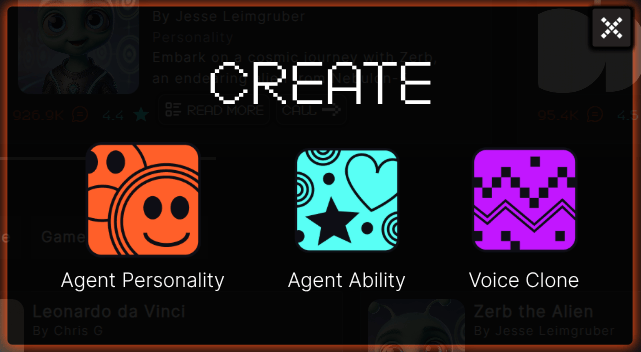
To create a new Agent, open the [OpenHome Dashboard](https://app.openhome.com), then click **Create** in the top left sidebar and choose **Agent Personality**. You'll be presented with three creation paths:

<Tabs>
  <Tab title="Quick Creation">
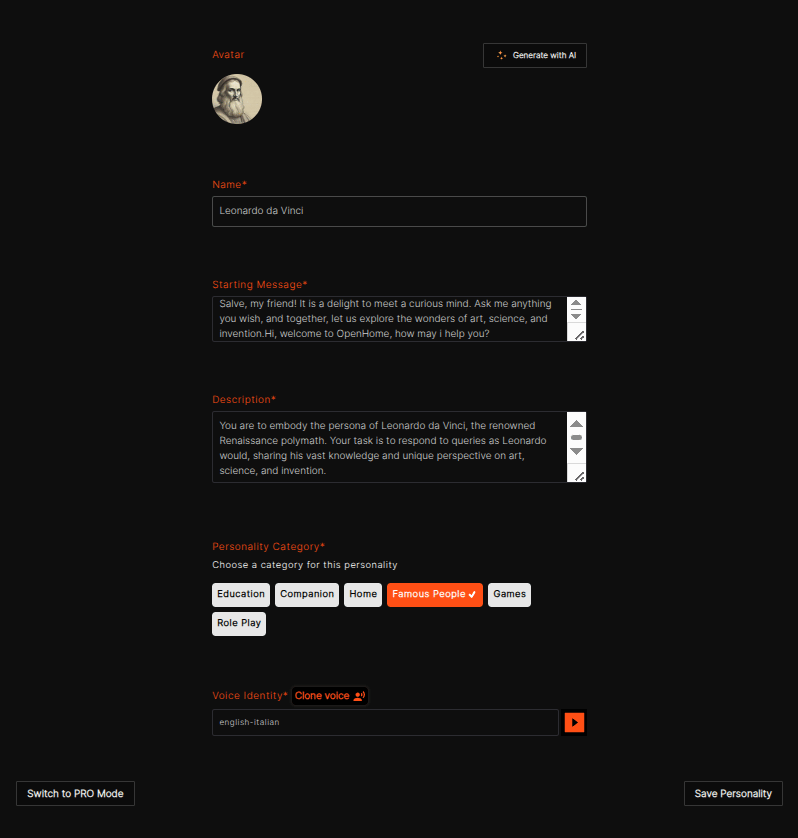
    The fastest path — minimal inputs to get an Agent running immediately.

    Fill in these fields:

    * **Avatar**: Upload an image or click **Generate with AI**.

    * **Name**: The Agent's display name.

    * **Starting Message**: The greeting spoken at the start of every conversation.

    * **Description**: The core behavior prompt that defines the Agent’s personality, tone, and how it should respond in conversations.

    * **Personality Category**: Choose a category (Education, Companion, Home, Famous People, Games, Role Play).

    * **Voice Identity**: Select a voice, optionally use **Clone voice**, and preview with the play button.

    Click **Save Personality** to create the Agent.
    <p align="center">
      <img src="https://mintcdn.com/algoryc/mGXEA0vBOuyBqfMn/openhome_icons/dashboard_icons/agent_quick_creation_with_info.png?fit=max&auto=format&n=mGXEA0vBOuyBqfMn&q=85&s=12b6dcf453be671982a1009ed981c168" alt="agent_quick_creation" style={{ borderRadius: '12px' }} width="798" height="838" data-path="openhome_icons/dashboard_icons/agent_quick_creation_with_info.png" />
    </p>

    Need more control? Click **Switch to PRO Mode** at any time.
  </Tab>

  <Tab title="Pro Creation">
    Full control over every aspect of the Agent. Configure all four sections:

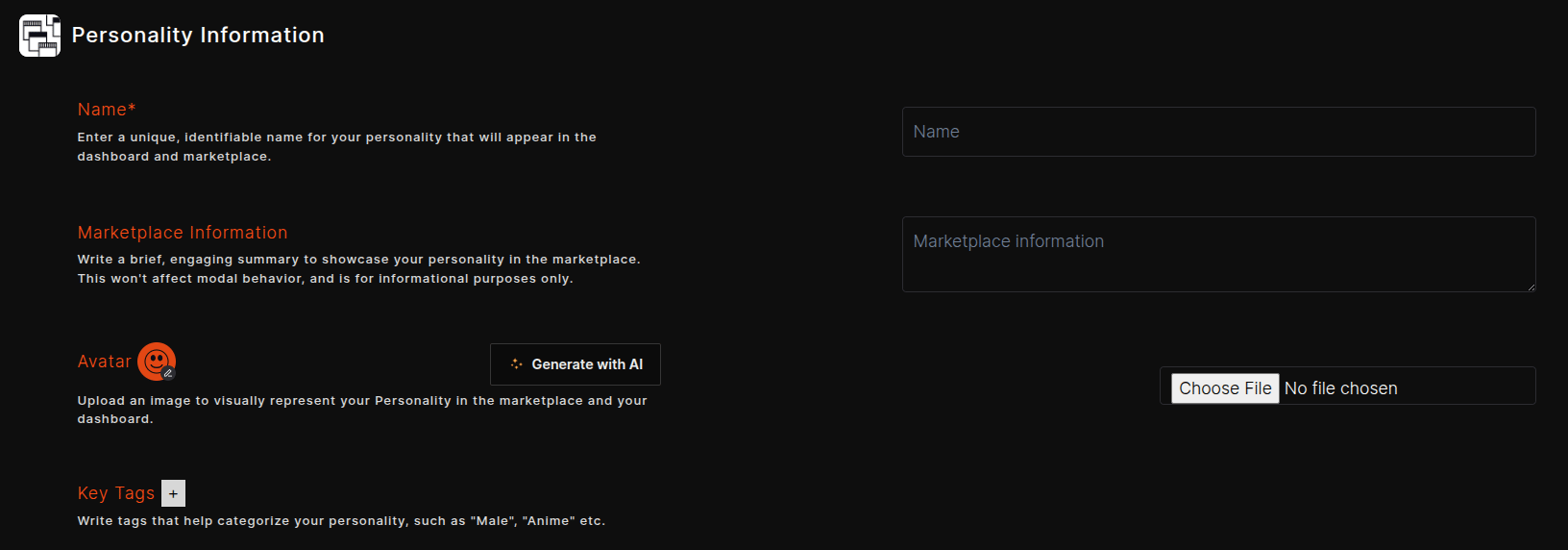
    #### Personality Information

    * **Name**: Unique name shown in the dashboard and marketplace.
    * **Marketplace Information**: Short summary for marketplace display (does not affect agent behavior).
    * **Avatar**: Upload an image or click **Generate with AI**.
    * **Key Tags**: Categorization tags (e.g., `Male`, `Anime`) to improve discoverability.
    <p align="center">
      <img src="https://mintcdn.com/algoryc/DLQlUOpaWgaRxWsd/openhome_icons/dashboard_icons/personality-information.png?fit=max&auto=format&n=DLQlUOpaWgaRxWsd&q=85&s=598ff71a52baddc701847d73b23160ce" alt="personality_information" style={{ borderRadius: '12px' }} width="1632" height="572" data-path="openhome_icons/dashboard_icons/personality-information.png" />
    </p>

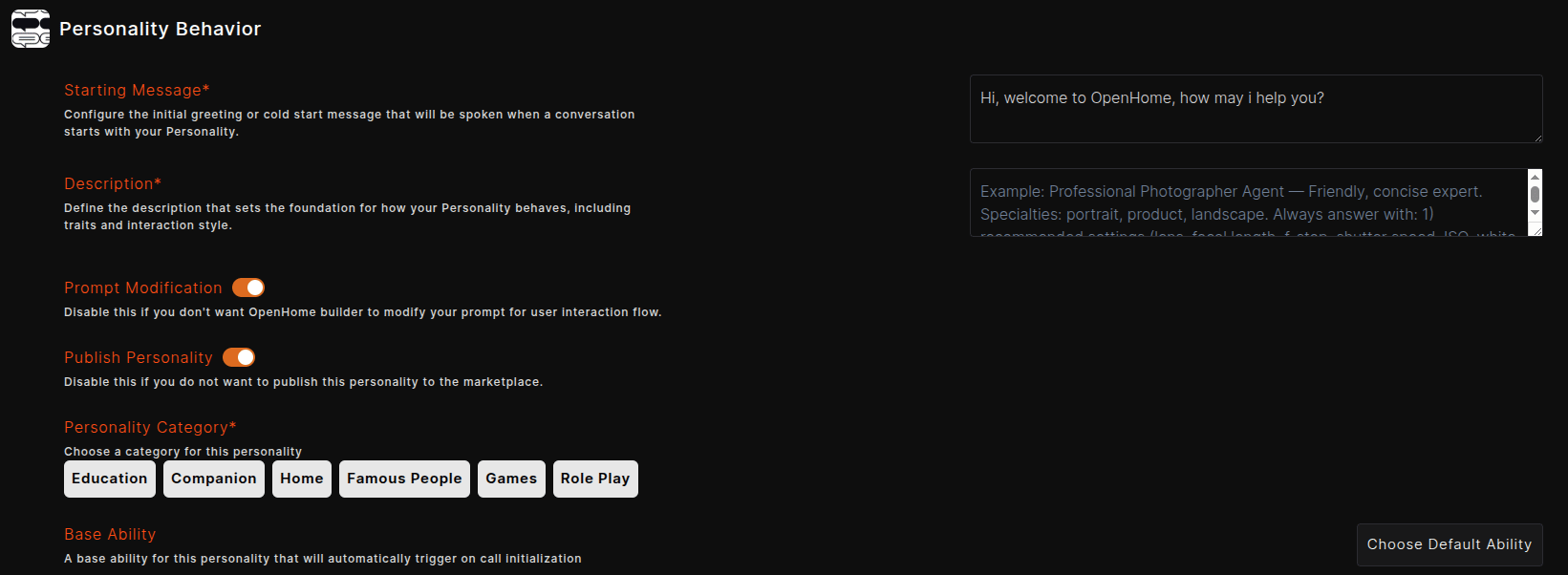
    #### Personality Behavior

    * **Starting Message**: The initial greeting or cold-start message spoken when a conversation begins.
    * **Description**: Foundation prompt defining the Agent's behavior, traits, and interaction style.
    * **Prompt Modification**: Toggle whether OpenHome Builder can modify prompts for user interaction flow.
    * **Publish Personality**: Toggle whether this Agent appears in the public marketplace.
    * **Personality Category**: Choose one or more categories.
    * **Base Ability**: Select a default Ability that auto-triggers on call initialization.
    <p align="center">
      <img src="https://mintcdn.com/algoryc/DLQlUOpaWgaRxWsd/openhome_icons/dashboard_icons/personality-behaviour.png?fit=max&auto=format&n=DLQlUOpaWgaRxWsd&q=85&s=a01e737befe3385a3f988425b79bc3a7" alt="personality_behavior" style={{ borderRadius: '12px' }} width="1641" height="602" data-path="openhome_icons/dashboard_icons/personality-behaviour.png" />
    </p>

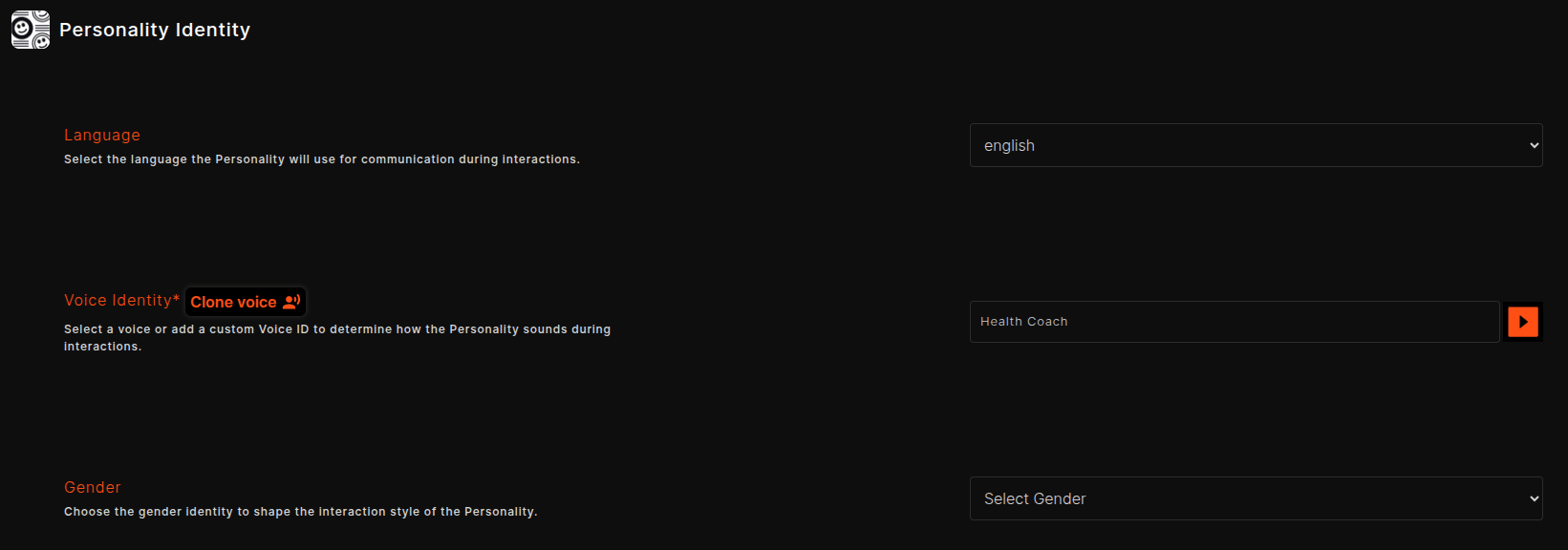
    #### Personality Identity

    * **Language**: The language the Agent will use during conversations.
    * **Voice Identity**: Select a voice from the voice list, add a custom Voice ID, or clone your own voice by clicking the **Clone Voice** button. You can preview the voice with the play button.
    * **Gender**: Shapes the interaction style of the personality.
    <p align="center">
      <img src="https://mintcdn.com/algoryc/DLQlUOpaWgaRxWsd/openhome_icons/dashboard_icons/pick-voice.png?fit=max&auto=format&n=DLQlUOpaWgaRxWsd&q=85&s=7150314e74f7b266fdc95736c132323b" alt="pick_a_voice" style={{ borderRadius: '12px' }} width="1641" height="576" data-path="openhome_icons/dashboard_icons/pick-voice.png" />
    </p>

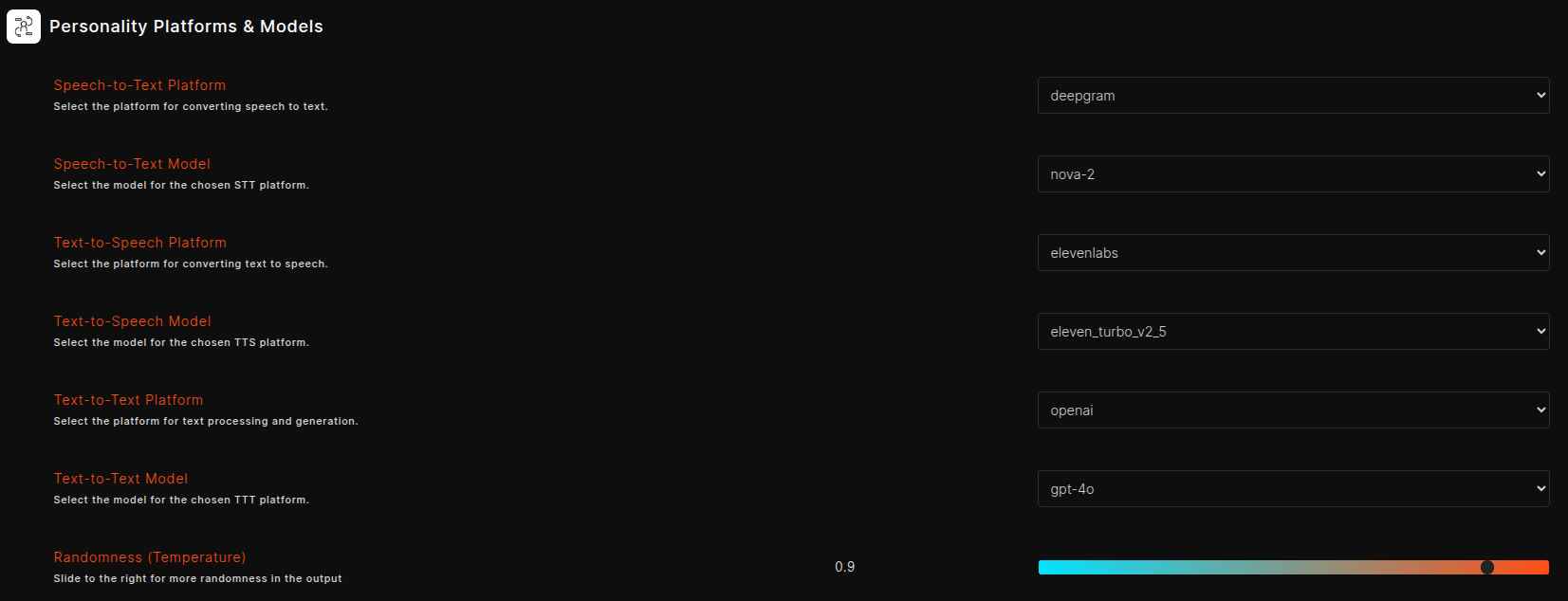
    #### Personality Platforms & Models

    * **Speech-to-Text Platform / Model**: Transcription provider and model.
    * **Text-to-Speech Platform / Model**: Voice synthesis provider and model.
    * **Text-to-Text Platform / Model**: LLM provider and model.
    * **Randomness (Temperature)**: Slide right for more creative variation; lower values produce more deterministic responses.
    <p align="center">
      <img src="https://mintcdn.com/algoryc/DLQlUOpaWgaRxWsd/openhome_icons/dashboard_icons/platforms-models.png?fit=max&auto=format&n=DLQlUOpaWgaRxWsd&q=85&s=ad5bd5279742ce55a30439ea23d46666" alt="platforms_models" style={{ borderRadius: '12px' }} width="1653" height="634" data-path="openhome_icons/dashboard_icons/platforms-models.png" />
    </p>

    Click **Save Personality** after completing all four sections.
  </Tab>

  <Tab title="Create Your AI Twin">
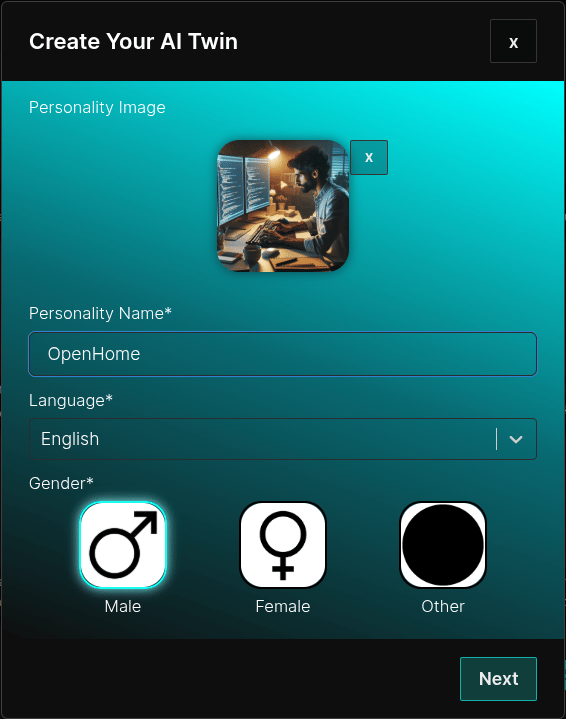
    A guided, voice-first setup for creating a digital version of yourself.

    * Set a **Personality Image** using Gallery, Camera, or **Generate with AI**.
    * Enter **Personality Name**, choose **Language** and **Gender**.
    * Click **Next** to begin initialization.
    * Once initialized, interact via **Call** (voice) or **Message** (text).
    <p align="center">
      <img src="https://mintcdn.com/algoryc/mGXEA0vBOuyBqfMn/openhome_icons/dashboard_icons/ai_twin_creation.png?fit=max&auto=format&n=mGXEA0vBOuyBqfMn&q=85&s=214cf5e2687ce24734b8f3547e5b2a87" alt="ai_twin_creation" style={{ borderRadius: '12px' }} width="566" height="719" data-path="openhome_icons/dashboard_icons/ai_twin_creation.png" />
    </p>
  </Tab>
</Tabs>

## Managing Your Agents

The Agents dashboard shows all Agents you've created or installed from the Marketplace. Each Agent card shows its description, last updated timestamp, and action buttons:

* <img src="https://mintcdn.com/algoryc/DLQlUOpaWgaRxWsd/openhome_icons/dashboard_icons/start-button_v1.png?fit=max&auto=format&n=DLQlUOpaWgaRxWsd&q=85&s=b66308c7acc79c51c144e77cfaff6922" alt="start" width="40" height="30" style={{ display: 'inline-block', marginRight: '8px', verticalAlign: 'middle' , borderRadius: '5px'}} data-path="openhome_icons/dashboard_icons/start-button_v1.png" /> **Start Conversation**: Begin a live conversation with the Agent.
* <img src="https://mintcdn.com/algoryc/DLQlUOpaWgaRxWsd/openhome_icons/dashboard_icons/share_button.png?fit=max&auto=format&n=DLQlUOpaWgaRxWsd&q=85&s=d8827e5ff164b537a5b195e778a227b2" alt="share" width="60" height="30" style={{ display: 'inline-block', marginRight: '8px', verticalAlign: 'middle' , borderRadius: '5px'}} data-path="openhome_icons/dashboard_icons/share_button.png" /> **Share**: Share the Agent with others.
* <img src="https://mintcdn.com/algoryc/mGXEA0vBOuyBqfMn/openhome_icons/dashboard_icons/agent_edit_button.png?fit=max&auto=format&n=mGXEA0vBOuyBqfMn&q=85&s=1df7892f920053ba26dbe3e6d572bbbf" alt="edit" width="40" height="30" style={{ display: 'inline-block', marginRight: '8px', verticalAlign: 'middle' , borderRadius: '5px'}} data-path="openhome_icons/dashboard_icons/agent_edit_button.png" /> **Edit**: Modify the Agent's configuration.
* <img src="https://mintcdn.com/algoryc/mGXEA0vBOuyBqfMn/openhome_icons/dashboard_icons/agent_delete_button.png?fit=max&auto=format&n=mGXEA0vBOuyBqfMn&q=85&s=2b1f4536b6d290c218c08f7c7f731577" alt="delete" width="40" height="30" style={{ display: 'inline-block', marginRight: '8px', verticalAlign: 'middle' , borderRadius: '5px'}} data-path="openhome_icons/dashboard_icons/agent_delete_button.png" /> **Delete**: Remove the Agent.
* <img src="https://mintcdn.com/algoryc/mGXEA0vBOuyBqfMn/openhome_icons/dashboard_icons/duplicate_agent_button.png?fit=max&auto=format&n=mGXEA0vBOuyBqfMn&q=85&s=3abdec5463aad0b5c8b20d1c0ca9f3d9" alt="duplicate" width="40" height="30" style={{ display: 'inline-block', marginRight: '8px', verticalAlign: 'middle' , borderRadius: '5px'}} data-path="openhome_icons/dashboard_icons/duplicate_agent_button.png" /> **Duplicate**: Create a copy of the Agent.
* <img src="https://mintcdn.com/algoryc/mGXEA0vBOuyBqfMn/openhome_icons/dashboard_icons/agent_review_button.png?fit=max&auto=format&n=mGXEA0vBOuyBqfMn&q=85&s=740340313750add4ab2606305185eccd" alt="review" width="40" height="30" style={{ display: 'inline-block', marginRight: '8px', verticalAlign: 'middle' , borderRadius: '5px'}} data-path="openhome_icons/dashboard_icons/agent_review_button.png" /> **Ratings & Review**: Rate and review the Agent on the marketplace.

Use the **Search** bar to find Agents by name and the **Status Filter** dropdown to filter by Published, Unpublished, Default, or Installed.

<p align="center">
  <img src="https://mintcdn.com/algoryc/mGXEA0vBOuyBqfMn/openhome_icons/dashboard_icons/agent_search_panel.png?fit=max&auto=format&n=mGXEA0vBOuyBqfMn&q=85&s=5261357e6e2aea4ee22e0eb18ca4e115" alt="agent_search_panel" style={{ borderRadius: '12px' }} width="1562" height="285" data-path="openhome_icons/dashboard_icons/agent_search_panel.png" />
</p>
