> ## Documentation Index
> Fetch the complete documentation index at: https://docs.openhome.com/llms.txt
> Use this file to discover all available pages before exploring further.
# Onboard OpenHome DevKit via Terminal
> Set up your OpenHome DevKit from your Mac, Linux, or Windows terminal.
This guide is for users without an iPhone. If you have an iOS device, we recommend the [OpenHome - Voice AI DevKit App](/devkit/devkit-onboarding-app) for the easiest setup.
## Prerequisites
* **Python 3.8 or later** installed on your computer
* **Bluetooth enabled** on your computer
* Your home Wi-Fi name and password
* An OpenHome account at [app.openhome.com](https://app.openhome.com)
 ## Step 1: Install the Required Library
Open your terminal and run:
```bash theme={"system"}
pip install bleak
```
## Step 2: Download the OpenHome Client
Download the OpenHome Client script
Save the file to a folder on your computer.
## Step 3: Run the OpenHome Client
In your terminal, navigate to the folder where you saved `openhome_client.py` and run:
```bash theme={"system"}
python openhome_client.py
```
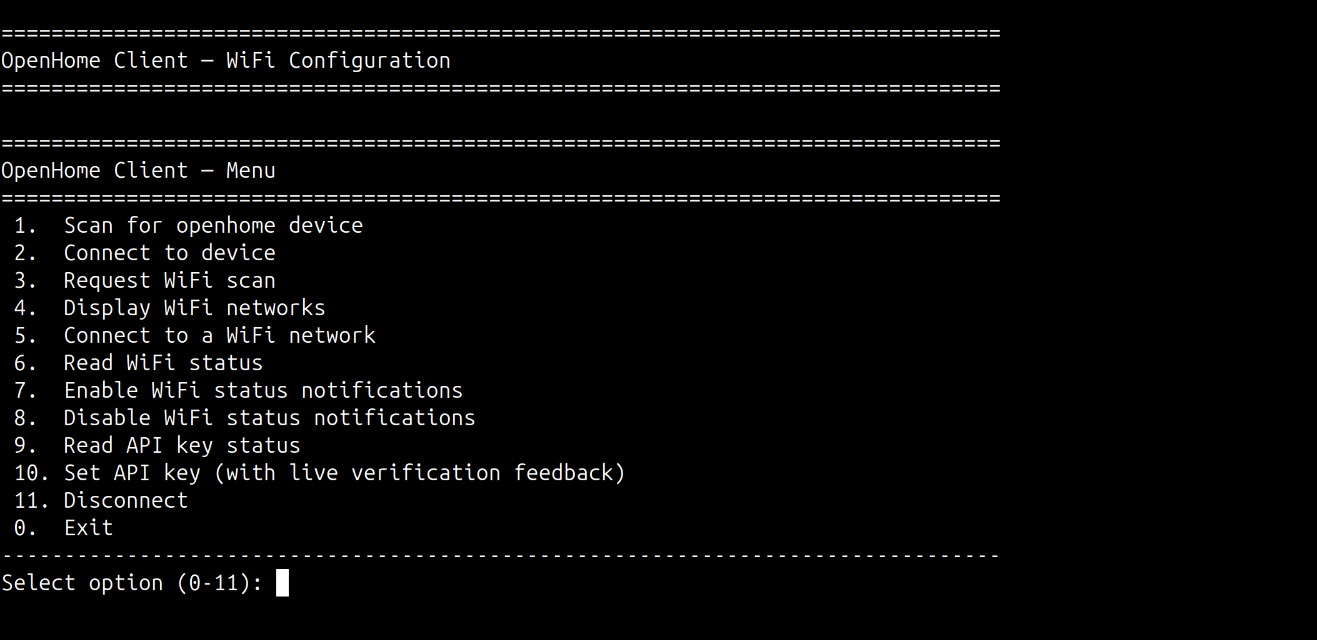
You will see a menu with numbered options. At the prompt `Select option (0-11):`, type the option number and press Enter. Run the steps below in order.
### 1. Scan for Your DevKit
Enter `1` to run **Scan for openhome device**.
The OpenHome Client will scan for nearby devices and automatically pick the one with the `openhome` prefix.
### 2. Connect to Your DevKit
Enter `2` to run **Connect to device**.
The OpenHome Client will establish a connection and confirm when connected.
### 3. Scan for Wi-Fi Networks
Enter `3` to run **Request WiFi scan**.
This will scan Wi-Fi networks on the DevKit and display a list of available networks.
### 4. Display Wi-Fi Networks
Enter `4` to run **Display WiFi networks** and view the list of available networks.
### 5. Connect to Your Wi-Fi
Enter `5` to run **Connect to a WiFi network**.
* Enter the number of your home Wi-Fi network from the list.
* Enter your Wi-Fi password when prompted.
The OpenHome Client will send the credentials to your DevKit and wait for a connection confirmation.
### 6. Verify Connection Status
Enter `6` to run **Read WiFi status** and confirm your DevKit is connected to Wi-Fi.
Options `7` and `8` enable/disable real-time WiFi status notifications from the DevKit — useful for debugging connection issues by streaming state changes live. Option `9` reads the current API key status. You can skip these for basic setup and proceed to step 10.
### 10. Set Your OpenHome API Key
Enter `10` to run **Set API key** and enter your API key when prompted.
You can find your API key in the OpenHome dashboard under [Profile → Settings → API Keys](https://app.openhome.com/dashboard/settings).
Once the key is set, your Agent will speak its welcome message. You can verify the API key status at any time by entering `9` to run **Read API key status**.
## Setup Complete
Your OpenHome DevKit is now set up and available in your dashboard under [DevKit](https://app.openhome.com/dashboard/devkit).
## Need Help?
Ran into an error during setup? Reach out to us on Discord and the OpenHome team will help you out.
## See also
* [Abilities](/ability) — extend your Agent with custom Python-based skills
* [Agents](/agents) — learn how voice Agents work on the OpenHome DevKit
* [Local Ability](/guides/getting-started/local-ability) — build Abilities that run directly on the OpenHome DevKit hardware
* [OpenHome - Voice AI DevKit App Overview](/devkit/devkit-companion-app-dashboard) — full overview of the OpenHome - Voice AI DevKit App
## Step 1: Install the Required Library
Open your terminal and run:
```bash theme={"system"}
pip install bleak
```
## Step 2: Download the OpenHome Client
Download the OpenHome Client script
Save the file to a folder on your computer.
## Step 3: Run the OpenHome Client
In your terminal, navigate to the folder where you saved `openhome_client.py` and run:
```bash theme={"system"}
python openhome_client.py
```
You will see a menu with numbered options. At the prompt `Select option (0-11):`, type the option number and press Enter. Run the steps below in order.
### 1. Scan for Your DevKit
Enter `1` to run **Scan for openhome device**.
The OpenHome Client will scan for nearby devices and automatically pick the one with the `openhome` prefix.
### 2. Connect to Your DevKit
Enter `2` to run **Connect to device**.
The OpenHome Client will establish a connection and confirm when connected.
### 3. Scan for Wi-Fi Networks
Enter `3` to run **Request WiFi scan**.
This will scan Wi-Fi networks on the DevKit and display a list of available networks.
### 4. Display Wi-Fi Networks
Enter `4` to run **Display WiFi networks** and view the list of available networks.
### 5. Connect to Your Wi-Fi
Enter `5` to run **Connect to a WiFi network**.
* Enter the number of your home Wi-Fi network from the list.
* Enter your Wi-Fi password when prompted.
The OpenHome Client will send the credentials to your DevKit and wait for a connection confirmation.
### 6. Verify Connection Status
Enter `6` to run **Read WiFi status** and confirm your DevKit is connected to Wi-Fi.
Options `7` and `8` enable/disable real-time WiFi status notifications from the DevKit — useful for debugging connection issues by streaming state changes live. Option `9` reads the current API key status. You can skip these for basic setup and proceed to step 10.
### 10. Set Your OpenHome API Key
Enter `10` to run **Set API key** and enter your API key when prompted.
You can find your API key in the OpenHome dashboard under [Profile → Settings → API Keys](https://app.openhome.com/dashboard/settings).
Once the key is set, your Agent will speak its welcome message. You can verify the API key status at any time by entering `9` to run **Read API key status**.
## Setup Complete
Your OpenHome DevKit is now set up and available in your dashboard under [DevKit](https://app.openhome.com/dashboard/devkit).
## Need Help?
Ran into an error during setup? Reach out to us on Discord and the OpenHome team will help you out.
## See also
* [Abilities](/ability) — extend your Agent with custom Python-based skills
* [Agents](/agents) — learn how voice Agents work on the OpenHome DevKit
* [Local Ability](/guides/getting-started/local-ability) — build Abilities that run directly on the OpenHome DevKit hardware
* [OpenHome - Voice AI DevKit App Overview](/devkit/devkit-companion-app-dashboard) — full overview of the OpenHome - Voice AI DevKit App