> ## Documentation Index
> Fetch the complete documentation index at: https://docs.openhome.com/llms.txt
> Use this file to discover all available pages before exploring further.
# Local Abilities
> A special Ability type that runs on the OpenHome DevKit and can use hardware, connected peripherals, the file system, shell commands, and the device's Python environment.
Local Abilities are a specialized Ability type for running DevKit-side code from an OpenHome Ability. Unlike other Ability types, which operate only within the standard Ability runtime, Local Abilities can use the DevKit hardware, system resources, and the Python environment installed on the device.
This includes Python imports that are restricted in the standard runtime, file system operations, shell commands, hardware access such as GPIO pins, sensors, LEDs, and connected peripherals, and system-level data such as CPU, memory, temperature, and network state.
Use Local Abilities for IoT projects, custom hardware integrations, voice-controlled physical devices, device telemetry, long-running on-device tasks, and any use case that requires direct interaction with the DevKit or capabilities beyond the standard Ability runtime.
Local Abilities only run on actual OpenHome DevKit hardware. They do not run in the web Live Editor's simulated environment.
## How It Works
A Local Ability is split between the standard Ability runtime and DevKit-side execution. `main.py` handles the Agent flow, while `devkit_functions.py` runs hardware, system, and device-level code on the OpenHome DevKit.
### File Structure
| File | Runtime | Use for |
| --------------------- | ------------------------ | -------------------------------------------------------------------------------------------------------------------------------------------------------------- |
| `main.py` | Standard Ability runtime | Voice interaction, prompts, conversation state, SDK calls, and calls to DevKit-side functions. |
| `devkit_functions.py` | OpenHome DevKit | Hardware control, connected peripherals, system operations, shell commands, system telemetry, ambient intelligence workflows, and DevKit-side Python packages. |
| `requirements.txt` | OpenHome DevKit | Python dependencies installed for `devkit_functions.py`. |
The DevKit-side file **must** be named exactly `devkit_functions.py`. No other filename will be picked up by the platform.
Packages listed in `requirements.txt` are installed for `devkit_functions.py` on the OpenHome DevKit. They are not available in the standard Ability runtime where `main.py` runs.
### Calling DevKit Functions
Use `send_devkit_capability_action()` in `main.py` to run a registered function from `devkit_functions.py`.
```python theme={"system"}
result = await self.capability_worker.send_devkit_capability_action(
function_name="your_function_name",
args=["arg1", "arg2"],
timeout=10,
)
```
| Parameter | Type | Description |
| ----------------- | ------------------ | -------------------------------------------------------------------------------------------------------------------------------------------- |
| `function_name` | `str` | Name of the function registered in `devkit_functions.py`. |
| `args` | `list[str]` | Arguments passed to the DevKit function. Values are passed as strings; cast them inside `devkit_functions.py` when another type is required. |
| `timeout` | `int` | Maximum number of seconds to wait for the function to complete. |
| `capability_name` | `str` *(optional)* | Name of another installed Ability whose `devkit_functions.py` should handle the call. Omit to use the current Ability. |
### `devkit_functions.py` Execution Flow
`devkit_functions.py` runs on the OpenHome DevKit as a Python script. Functions that should be callable from `main.py` must be registered in `FUNCTION_REGISTRY`, and the `function_name` passed from `main.py` must match one of those registry keys.
`devkit_functions.py` should include a Python main guard: `if __name__ == "__main__"`. The main guard reads the requested function name and arguments, then runs the matching registered function.
Values in `args` are passed to the DevKit-side function as strings. Cast them inside `devkit_functions.py` when the function requires a specific type, such as an integer, boolean, or JSON object.
Use `print()` for output that should be returned to `main.py`; standard output is captured in `result["output"]`. Python `return` values are not captured by `send_devkit_capability_action()`.
Use `web_logger` for diagnostics. These logs appear in the **DevKit** section of the Ability Live Editor and are not returned to `main.py`.
### Response Shape
`send_devkit_capability_action()` returns an object with the execution status, captured output, and request metadata.
```python theme={"system"}
{
"success": True, # True if the DevKit function completed successfully
"output": "captured stdout", # Output from print() calls in devkit_functions.py
"error": None, # Captured stderr or execution error details
"function_name": "function_name", # Function that was executed
"args": ["arg1", "arg2"], # Arguments passed to the function
"capability_name": "ability_name" # Ability that handled the request
}
```
`output` contains the standard output produced during execution. If the function does not print anything, `output` is `None`.
`error` contains the error message when execution fails. Otherwise, it is `None`.
Logs written with `web_logger` are separate from the returned object. They appear in the **DevKit** section of the Ability Live Editor logs and are useful for debugging DevKit-side execution.
### Example: Wi-Fi Status
This example reads the DevKit's current Wi-Fi connection and speaks it back to the user.
**`devkit_functions.py`** — runs on the DevKit:
```python theme={"system"}
import json
import sys
import subprocess
from devkit_utils.devkit_logging import web_logger as log
def _print_payload(payload):
output = json.dumps(payload)
log.info("stdout payload: %s", output)
print(output)
def check_wifi():
try:
result = subprocess.run(
["iwgetid", "-r"], capture_output=True, text=True, timeout=5
)
ssid = result.stdout.strip()
if ssid:
_print_payload({
"success": True,
"metric": "wifi",
"spoken_response": f"Wi-Fi is connected to {ssid}.",
"data": {"connected": True, "ssid": ssid},
"error": None,
})
else:
_print_payload({
"success": True,
"metric": "wifi",
"spoken_response": "Wi-Fi is not connected.",
"data": {"connected": False, "ssid": None},
"error": None,
})
except Exception as error:
log.exception("check_wifi failed")
_print_payload({
"success": False,
"metric": "wifi",
"spoken_response": "I couldn't read Wi-Fi status.",
"data": {},
"error": {
"code": "wifi_error",
"message": str(error),
},
})
FUNCTION_REGISTRY = {
"check_wifi": check_wifi,
}
if __name__ == "__main__":
function_name = sys.argv[1]
FUNCTION_REGISTRY[function_name](*sys.argv[2:])
```
**`main.py`** — runs in the standard Ability runtime:
```python theme={"system"}
import json
from src.agent.capability import MatchingCapability
from src.main import AgentWorker
from src.agent.capability_worker import CapabilityWorker
class WifiStatusCapability(MatchingCapability):
worker: AgentWorker = None
capability_worker: CapabilityWorker = None
#{{register capability}}
async def first_function(self):
try:
result = await self.capability_worker.send_devkit_capability_action(
function_name="check_wifi",
args=[],
timeout=5,
)
await self.capability_worker.speak(self._spoken_response_from_result(result))
finally:
self.capability_worker.resume_normal_flow()
def _spoken_response_from_result(self, result):
if not isinstance(result, dict) or not result.get("success"):
return "I couldn't fetch Wi-Fi status from the DevKit."
output = (result.get("output") or "").strip()
if not output:
return "The DevKit did not return Wi-Fi status."
try:
payload = json.loads(output)
except json.JSONDecodeError:
return "I couldn't read the DevKit response."
return payload.get("spoken_response") or "I couldn't read Wi-Fi status."
def call(self, worker: AgentWorker):
self.worker = worker
self.capability_worker = CapabilityWorker(self)
self.worker.session_tasks.create(self.first_function())
```
### Calling Functions from Another Local Ability
`main.py` can also call functions from another installed Local Ability's `devkit_functions.py`. This is useful when one Local Ability exposes reusable DevKit-side functions that another Ability needs to use.
`capability_name` is only needed for cross-Ability calls. When it is omitted, the call uses the current Ability's `devkit_functions.py`.
```python theme={"system"}
result = await self.capability_worker.send_devkit_capability_action(
function_name="get_sensor_value",
args=["temperature"],
timeout=10,
capability_name="target_ability_name",
)
```
To find the name of an installed Ability to use as `capability_name`, see [Installed Abilities](#installed-abilities) later in this document.
## Local Abilities in the Live Editor
### Select the Local Category
To create a Local Ability, select **Local** from the Ability categories and choose a template.
If you upload a custom Ability, the project must include `devkit_functions.py` and `requirements.txt`.
### Advanced DevKit Controls
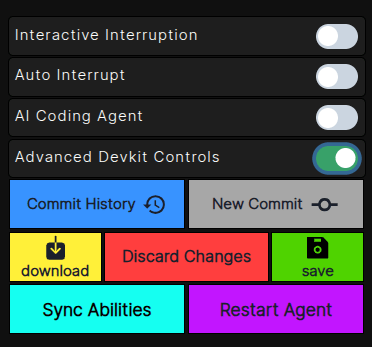
If your DevKit is online and connected, the **Advanced DevKit Controls** toggle appears in the Ability Editor. Enable it to expand the Advanced DevKit Controls section.
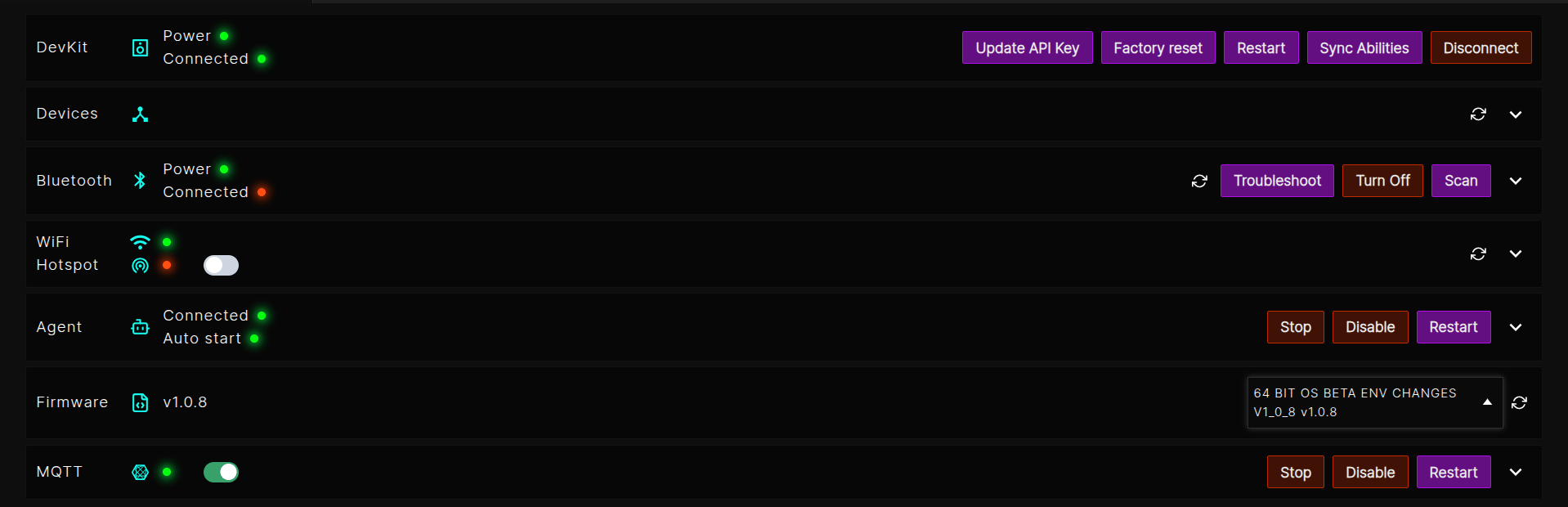
Once Advanced DevKit Controls are enabled, scroll down and you will see the Advanced DevKit Controls section. From here you can sync your Ability to the DevKit, restart the Agent, and view the DevKit connection status.
### Sync Local Abilities with the DevKit
When the DevKit is online and connected, changes saved in the Live Editor are synced to the DevKit automatically.
On save:
* **`devkit_functions.py` or `requirements.txt`** changes are pushed to the DevKit without restarting the Agent. If `requirements.txt` changed, new dependencies are installed on the DevKit.
* **`main.py`** changes are saved to the OpenHome platform, synced with the DevKit sandbox, and the Agent restarts on the DevKit so the latest Ability code is used.
When editing `main.py`, save after completing the intended change. Each save can restart the Agent on the DevKit while the DevKit is connected.
If the DevKit was offline while you updated a Local Ability:
* **`main.py`** changes sync when the DevKit reconnects.
* **`devkit_functions.py` or `requirements.txt`** changes should be synced before testing. After the DevKit reconnects, click **Sync Abilities** from Advanced DevKit Controls to apply the latest changes.
You can also sync from **Advanced DevKit Controls** in the Live Editor, or from the **OpenHome - Voice AI Devkit App** dashboard using the **Sync Abilities** button  .
### Logging on the DevKit
Use the DevKit logger inside `devkit_functions.py` to debug on-device behavior. Messages written with this logger appear in the **DevKit** section of the Ability Editor logs.
```python theme={"system"}
from devkit_utils.devkit_logging import web_logger as log
log.info("devkit stats functions loaded")
def check_temperature():
log.info("check_temperature: entry")
# Your DevKit-side code runs here
log.info("check_temperature: completed")
```
To view the logs, open the **DevKit** section inside the Ability Editor logs after triggering the Ability on the DevKit.
.
### Logging on the DevKit
Use the DevKit logger inside `devkit_functions.py` to debug on-device behavior. Messages written with this logger appear in the **DevKit** section of the Ability Editor logs.
```python theme={"system"}
from devkit_utils.devkit_logging import web_logger as log
log.info("devkit stats functions loaded")
def check_temperature():
log.info("check_temperature: entry")
# Your DevKit-side code runs here
log.info("check_temperature: completed")
```
To view the logs, open the **DevKit** section inside the Ability Editor logs after triggering the Ability on the DevKit.

### Installed Abilities
To use functions from another Ability's `devkit_functions.py`, you need that Ability's name to pass in the `capability_name` parameter. To find it, click the **Quick Reference Installed Abilities** button in the top-left corner of the Ability Editor.
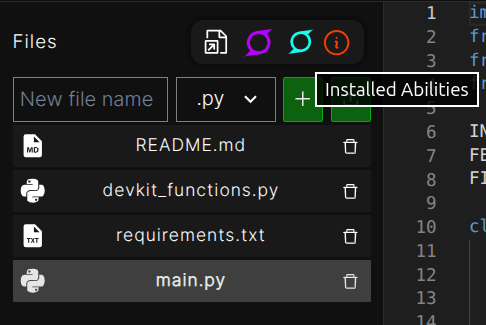
This opens the installed Local Abilities list. Copy the name of the Local Ability that contains the target `devkit_functions.py` file and pass it in the `capability_name` parameter.
## Example: DevKit Stats
This is a voice-controlled DevKit telemetry reporter. Users say something like *"check cpu"* or *"how hot is the devkit"* and the DevKit reads its system stats and speaks them back.
### Trigger words
This example can be triggered with phrases like:
* `devkit info`
* `system info`
* `how long has my devkit been running`
### `requirements.txt`
No third-party packages are required for this example — all stat checks use Python's standard library and standard Linux interfaces (`/proc`, `/sys`, and shell commands like `iwgetid`, `df`).
For other Local Abilities that need hardware libraries, list them here. Some common examples:
```
rpi-ws281x # NeoPixel / WS281x LED strip control
gpiozero # high-level GPIO pin control
RPi.GPIO # low-level GPIO access
picamera2 # camera access
adafruit-blinka # CircuitPython compatibility for sensors
smbus2 # I2C bus communication
pyserial # serial port communication
```
Only the packages you actually import in `devkit_functions.py` need to go here — they get installed on the DevKit side when you sync.
### `main.py` — standard Ability runtime
````python theme={"system"}
import json
import re
from src.agent.capability import MatchingCapability
from src.main import AgentWorker
from src.agent.capability_worker import CapabilityWorker
AVAILABLE_STATS = {
"get_cpu": "CPU usage",
"get_memory": "Memory usage",
"get_temperature": "Device temperature",
"get_uptime": "Device uptime",
"get_wifi": "Wi-Fi connection",
"get_disk": "Disk usage",
"get_health": "Overall device health",
"get_all_stats": "Summary of all key metrics",
}
FUNCTIONS_DESCRIPTION = "\n".join(
f"- {name}: {description}" for name, description in AVAILABLE_STATS.items()
)
SYSTEM_PROMPT = f"""You are a request router for a DevKit telemetry Ability. Your sole responsibility is to map user input to exactly one function name. You do not answer questions, explain concepts, or generate conversational responses.
## Device Context
The OpenHome DevKit is the user's locally connected device. Telemetry refers to its live runtime metrics: CPU, memory, temperature, uptime, Wi-Fi, disk, and health. This Ability is limited strictly to the functions listed below.
## Response Format
Always return a single JSON object. No prose, no markdown, no extra keys.
{{"function_name": ""}}
## Available Functions
{FUNCTIONS_DESCRIPTION}
## Routing Rules
- General status, "all stats", "everything", "snapshot", "system info" -> get_all_stats
- CPU, processor, load, compute, busy, usage -> get_cpu
- Memory, RAM, available memory, used memory -> get_memory
- Temperature, temp, heat, thermal, hot, warm -> get_temperature
- Uptime, boot time, running time, how long running -> get_uptime
- Wi-Fi, wifi, network, SSID, connection -> get_wifi
- Disk, storage, free space, used space -> get_disk
- Health, diagnostics, issues, problems, anything wrong -> get_health
## Exit Routing
Trigger `exit` when the user says: stop, quit, cancel, end, done, all done, that's all, thank you, thanks, goodbye, bye — or any close variation, even with filler words.
## Unsupported Requests
If the request is unrelated to DevKit telemetry, or asks for telemetry not covered by any available function, return:
{{"function_name": "none"}}
## Hard Rules
- Return exactly one function_name per response.
- Never explain, define, or discuss any concept — even if directly asked.
- Route by intent: if the user asks "what is my CPU usage?" that is a CPU telemetry request -> get_cpu.
- Do not include any text outside the JSON object.
"""
class DevKitStatsCapability(MatchingCapability):
worker: AgentWorker = None
capability_worker: CapabilityWorker = None
#{{register capability}}
async def first_function(self):
try:
is_first_turn = True
conversation_history = []
while True:
if is_first_turn:
user_message = await self.capability_worker.wait_for_complete_transcription()
else:
user_message = await self.capability_worker.user_response()
if not user_message or not user_message.strip():
continue
route = self._route_to_devkit_function(user_message, conversation_history)
function_name = route.get("function_name", "")
if is_first_turn and function_name in ("", "none"):
function_name = "get_all_stats"
if function_name == "exit":
await self.capability_worker.speak("Exiting DevKit stats.")
break
if function_name not in AVAILABLE_STATS:
await self.capability_worker.speak(
"I can't fetch that DevKit information. Try asking for CPU, memory, temperature, disk, uptime, Wi-Fi, or health."
)
is_first_turn = False
continue
result = await self.capability_worker.send_devkit_capability_action(
function_name=function_name,
args=[],
timeout=8,
)
spoken_message = self._spoken_response_from_result(result)
await self.capability_worker.speak(spoken_message)
conversation_history.append({"role": "user", "content": user_message})
conversation_history.append({"role": "assistant", "content": spoken_message})
conversation_history = conversation_history[-12:]
await self.capability_worker.speak("Want me to check anything else, or say stop to exit.")
is_first_turn = False
except Exception as error:
self.worker.editor_logging_handler.error(f"DevKit stats failed: {error}")
await self.capability_worker.speak("Something went wrong while checking DevKit stats.")
finally:
self.capability_worker.resume_normal_flow()
def _route_to_devkit_function(self, user_message, conversation_history):
response = self.capability_worker.text_to_text_response(
f'User request: "{user_message}"',
conversation_history,
system_prompt=SYSTEM_PROMPT,
)
cleaned = re.sub(r"^```[a-zA-Z]*\n|\n```$", "", response.strip())
try:
return json.loads(cleaned)
except (json.JSONDecodeError, TypeError, ValueError):
return {"function_name": ""}
def _spoken_response_from_result(self, result):
if not isinstance(result, dict):
return "I couldn't reach the DevKit."
if not result.get("success"):
self.worker.editor_logging_handler.error(
f"DevKit call failed: {result.get('error')}"
)
return "I couldn't fetch that DevKit information. Try asking for another stat."
output = (result.get("output") or "").strip()
if not output:
return "I couldn't fetch that DevKit information. Try asking for another stat."
try:
payload = json.loads(output)
except json.JSONDecodeError:
self.worker.editor_logging_handler.error(f"Invalid DevKit output: {output}")
return "I couldn't read the DevKit response."
if not payload.get("success"):
error = payload.get("error") or {}
self.worker.editor_logging_handler.warning(
f"DevKit stat unavailable: {error.get('code')} {error.get('message')}"
)
return payload.get("spoken_response") or "I couldn't read that DevKit stat."
def call(self, worker: AgentWorker):
self.worker = worker
self.capability_worker = CapabilityWorker(self)
self.worker.session_tasks.create(self.first_function())
````
### `devkit_functions.py` — DevKit-side telemetry
```python theme={"system"}
import json
import shutil
import subprocess
import sys
import time
from devkit_utils.devkit_logging import web_logger as log
def _emit_success(metric, spoken, data=None):
payload = {
"success": True,
"metric": metric,
"spoken_response": spoken,
"data": data or {},
"error": None,
}
serialized_payload = json.dumps(payload)
log.info("stdout payload: %s", serialized_payload)
print(serialized_payload)
def _emit_error(metric, code, message, spoken):
log.error("%s failed [%s]: %s", metric, code, message)
payload = {
"success": False,
"metric": metric,
"spoken_response": spoken,
"data": {},
"error": {
"code": code,
"message": message,
},
}
serialized_payload = json.dumps(payload)
log.info("stdout payload: %s", serialized_payload)
print(serialized_payload)
def _read_text_file(path):
try:
with open(path, "r", encoding="utf-8") as file_handle:
return file_handle.read().strip()
except (FileNotFoundError, PermissionError, OSError) as error:
log.warning("Could not read %s: %s", path, error)
return ""
def _run_command(command, timeout=5):
try:
completed = subprocess.run(
command,
shell=True,
capture_output=True,
text=True,
timeout=timeout,
)
except subprocess.TimeoutExpired:
log.warning("Command timed out: %s", command)
return ""
except OSError as error:
log.warning("Command failed: %s: %s", command, error)
return ""
if completed.returncode != 0:
log.warning("Command returned %s: %s", completed.returncode, command)
return ""
return completed.stdout.strip()
def _safe_int(value):
try:
return int(value)
except (TypeError, ValueError):
return None
def _safe_float(value):
try:
return float(value)
except (TypeError, ValueError):
return None
def _read_memory_kb(field_name):
meminfo = _read_text_file("/proc/meminfo")
for line in meminfo.splitlines():
if line.startswith(field_name):
value = line.split(":", 1)[1].strip().split()[0]
return _safe_int(value)
return None
def _read_cpu_sample():
stat = _read_text_file("/proc/stat")
for line in stat.splitlines():
if line.startswith("cpu "):
values = [_safe_int(value) or 0 for value in line.split()[1:]]
if len(values) < 4:
return None
idle = values[3] + (values[4] if len(values) > 4 else 0)
return {"idle": idle, "total": sum(values)}
return None
def _read_cpu_usage_percent(sample_seconds=0.4):
first = _read_cpu_sample()
time.sleep(sample_seconds)
second = _read_cpu_sample()
if not first or not second:
return None
total_delta = second["total"] - first["total"]
idle_delta = second["idle"] - first["idle"]
if total_delta <= 0:
return None
return round((1 - idle_delta / total_delta) * 100)
def _gb_from_kb(value):
if value is None:
return None
return round(value / 1024 / 1024, 1)
def _temperature_status(celsius):
if celsius < 50:
return "running cool"
if celsius < 65:
return "comfortable"
if celsius < 75:
return "warm"
if celsius < 85:
return "hot"
return "very hot"
def get_cpu():
metric = "cpu"
log.info("get_cpu called")
try:
used_percent = _read_cpu_usage_percent()
if used_percent is None:
_emit_error(metric, "cpu_unavailable", "CPU usage could not be read.", "I couldn't read CPU usage.")
return
free_percent = 100 - used_percent
_emit_success(
metric,
f"CPU is {used_percent} percent used and {free_percent} percent free.",
{"used_percent": used_percent, "free_percent": free_percent},
)
except Exception as error:
log.exception("Unhandled error in get_cpu")
_emit_error(metric, "cpu_error", str(error), "I couldn't read CPU usage.")
def get_memory():
metric = "memory"
log.info("get_memory called")
try:
total_gb = _gb_from_kb(_read_memory_kb("MemTotal:"))
available_gb = _gb_from_kb(_read_memory_kb("MemAvailable:"))
if total_gb is None or available_gb is None:
_emit_error(metric, "memory_unavailable", "Memory info could not be read.", "I couldn't read memory usage.")
return
used_gb = round(total_gb - available_gb, 1)
_emit_success(
metric,
f"Memory has {used_gb} gigabytes used out of {total_gb}, with {available_gb} gigabytes available.",
{"total_gb": total_gb, "used_gb": used_gb, "available_gb": available_gb},
)
except Exception as error:
log.exception("Unhandled error in get_memory")
_emit_error(metric, "memory_error", str(error), "I couldn't read memory usage.")
def get_temperature():
metric = "temperature"
log.info("get_temperature called")
try:
raw_value = _read_text_file("/sys/class/thermal/thermal_zone0/temp")
millicelsius = _safe_int(raw_value)
if millicelsius is None:
_emit_error(metric, "temperature_unavailable", "Temperature value could not be read.", "I couldn't read the DevKit temperature.")
return
celsius = round(millicelsius / 1000, 1)
status = _temperature_status(celsius)
_emit_success(
metric,
f"DevKit temperature is {celsius} degrees Celsius and {status}.",
{"celsius": celsius, "status": status},
)
except Exception as error:
log.exception("Unhandled error in get_temperature")
_emit_error(metric, "temperature_error", str(error), "I couldn't read the DevKit temperature.")
def get_uptime():
metric = "uptime"
log.info("get_uptime called")
try:
uptime_text = _read_text_file("/proc/uptime")
uptime_seconds = _safe_float(uptime_text.split()[0]) if uptime_text else None
if uptime_seconds is None:
_emit_error(metric, "uptime_unavailable", "Uptime could not be read.", "I couldn't read DevKit uptime.")
return
days = int(uptime_seconds // 86400)
hours = int((uptime_seconds % 86400) // 3600)
minutes = int((uptime_seconds % 3600) // 60)
if days:
spoken_duration = f"{days} days and {hours} hours"
elif hours:
spoken_duration = f"{hours} hours and {minutes} minutes"
else:
spoken_duration = f"{minutes} minutes"
_emit_success(
metric,
f"The DevKit has been running for {spoken_duration}.",
{"seconds": round(uptime_seconds), "days": days, "hours": hours, "minutes": minutes},
)
except Exception as error:
log.exception("Unhandled error in get_uptime")
_emit_error(metric, "uptime_error", str(error), "I couldn't read DevKit uptime.")
def get_wifi():
metric = "wifi"
log.info("get_wifi called")
try:
ssid = _run_command("iwgetid -r 2>/dev/null")
if not ssid:
_emit_success(metric, "Wi-Fi is not connected.", {"connected": False, "ssid": None})
return
_emit_success(metric, f"Wi-Fi is connected to {ssid}.", {"connected": True, "ssid": ssid})
except Exception as error:
log.exception("Unhandled error in get_wifi")
_emit_error(metric, "wifi_error", str(error), "I couldn't read Wi-Fi status.")
def get_disk():
metric = "disk"
log.info("get_disk called")
try:
total_bytes, used_bytes, free_bytes = shutil.disk_usage("/")
total_gb = round(total_bytes / 1_000_000_000, 1)
used_gb = round(used_bytes / 1_000_000_000, 1)
free_gb = round(free_bytes / 1_000_000_000, 1)
used_percent = round((used_bytes / total_bytes) * 100)
_emit_success(
metric,
f"Disk is {used_percent} percent used, with {free_gb} gigabytes free.",
{
"total_gb": total_gb,
"used_gb": used_gb,
"free_gb": free_gb,
"used_percent": used_percent,
},
)
except Exception as error:
log.exception("Unhandled error in get_disk")
_emit_error(metric, "disk_error", str(error), "I couldn't read disk usage.")
def get_health():
metric = "health"
log.info("get_health called")
try:
issues = []
data = {}
raw_temperature = _safe_int(_read_text_file("/sys/class/thermal/thermal_zone0/temp"))
if raw_temperature is not None:
celsius = round(raw_temperature / 1000, 1)
data["temperature_celsius"] = celsius
if celsius >= 75:
issues.append(f"temperature is high at {celsius} degrees Celsius")
available_kb = _read_memory_kb("MemAvailable:")
if available_kb is not None:
available_mb = round(available_kb / 1024)
data["memory_available_mb"] = available_mb
if available_mb < 200:
issues.append(f"memory is low with {available_mb} megabytes available")
disk_total, disk_used, _ = shutil.disk_usage("/")
disk_used_percent = round((disk_used / disk_total) * 100)
data["disk_used_percent"] = disk_used_percent
if disk_used_percent >= 90:
issues.append(f"disk usage is high at {disk_used_percent} percent")
data["issues"] = issues
if not issues:
_emit_success(metric, "The DevKit looks healthy.", data)
elif len(issues) == 1:
_emit_success(metric, f"I found one issue: {issues[0]}.", data)
else:
_emit_success(metric, f"I found {len(issues)} issues: {', '.join(issues[:2])}.", data)
except Exception as error:
log.exception("Unhandled error in get_health")
_emit_error(metric, "health_error", str(error), "I couldn't run the DevKit health check.")
def get_all_stats():
metric = "all_stats"
log.info("get_all_stats called")
try:
cpu_percent = _read_cpu_usage_percent()
raw_temperature = _safe_int(_read_text_file("/sys/class/thermal/thermal_zone0/temp"))
temperature_celsius = round(raw_temperature / 1000, 1) if raw_temperature is not None else None
total_memory_gb = _gb_from_kb(_read_memory_kb("MemTotal:"))
available_memory_gb = _gb_from_kb(_read_memory_kb("MemAvailable:"))
ssid = _run_command("iwgetid -r 2>/dev/null")
total_bytes, used_bytes, free_bytes = shutil.disk_usage("/")
free_disk_gb = round(free_bytes / 1_000_000_000, 1)
disk_used_percent = round((used_bytes / total_bytes) * 100)
data = {
"cpu_used_percent": cpu_percent,
"temperature_celsius": temperature_celsius,
"memory_total_gb": total_memory_gb,
"memory_available_gb": available_memory_gb,
"wifi_connected": bool(ssid),
"wifi_ssid": ssid or None,
"disk_free_gb": free_disk_gb,
"disk_used_percent": disk_used_percent,
}
spoken_parts = []
if temperature_celsius is not None:
spoken_parts.append(f"temperature is {temperature_celsius} degrees Celsius")
if cpu_percent is not None:
spoken_parts.append(f"CPU is {cpu_percent} percent used")
if available_memory_gb is not None and total_memory_gb is not None:
spoken_parts.append(f"memory has {available_memory_gb} gigabytes available")
spoken_parts.append(f"disk is {disk_used_percent} percent used")
spoken_parts.append(f"Wi-Fi is connected to {ssid}" if ssid else "Wi-Fi is not connected")
_emit_success(metric, "DevKit snapshot: " + ", ".join(spoken_parts) + ".", data)
except Exception as error:
log.exception("Unhandled error in get_all_stats")
_emit_error(metric, "all_stats_error", str(error), "I couldn't gather the DevKit snapshot.")
FUNCTION_REGISTRY = {
"get_cpu": get_cpu,
"get_memory": get_memory,
"get_temperature": get_temperature,
"get_uptime": get_uptime,
"get_wifi": get_wifi,
"get_disk": get_disk,
"get_health": get_health,
"get_all_stats": get_all_stats,
}
def main():
if len(sys.argv) < 2:
_emit_error("dispatch", "missing_function", "No function name was provided.", "No DevKit function was provided.")
sys.exit(1)
function_name = sys.argv[1]
function_args = sys.argv[2:]
function = FUNCTION_REGISTRY.get(function_name)
if function is None:
_emit_error(
"dispatch",
"unknown_function",
f"Unknown function: {function_name}",
"The requested DevKit function is not available.",
)
sys.exit(1)
try:
function(*function_args)
except TypeError as error:
log.exception("Invalid arguments for %s", function_name)
_emit_error(
function_name,
"invalid_arguments",
str(error),
"The DevKit function received invalid arguments.",
)
sys.exit(1)
except Exception as error:
log.exception("Unhandled error while running %s", function_name)
_emit_error(
function_name,
"unhandled_error",
str(error),
"The DevKit function failed unexpectedly.",
)
sys.exit(1)
if __name__ == "__main__":
main()
```
## Interaction Flow
The user starts the Ability with a trigger phrase such as *"devkit stats"* or *"check cpu"*.
`main.py` keeps the voice flow in the standard Ability runtime and uses the LLM as a strict router from natural language to a registered DevKit telemetry function.
`main.py` calls `send_devkit_capability_action()` with the selected function name, arguments, and timeout. The matching function runs on the OpenHome DevKit from `devkit_functions.py`.
`devkit_functions.py` reads the requested device data, logs diagnostics with `web_logger`, and prints a structured JSON payload. The printed payload is captured in `result["output"]`.
`main.py` parses `result["output"]`, reads `spoken_response`, and speaks the result. The structured `data` field remains available for richer logic.
The Ability prompts for another stat or exits cleanly. On exit, `main.py` calls `resume_normal_flow()` so the Agent returns to its normal flow.
## Best practices
Clean separation makes both sides easier to debug. Keep `devkit_functions.py` focused on the hardware work.
Hardware calls can block. A 5–10 second timeout is typical for lightweight actions; bump to 30 or more for long-running effects or captures.
Use the DevKit logger `web_logger` for debugging and inspect messages in the **DevKit** logs section inside the Ability Editor.
Packages listed there are installed for `devkit_functions.py`. They are not available in the sandboxed runtime where `main.py` runs.
Not every DevKit has every peripheral. Wrap hardware initialization in `try/except` and log an informative error instead of crashing — your Ability can still speak a helpful message to the user.
## See also
* [Ability Types](/ability-types) — when Local is the right choice vs. Skill, Agent Controlled, or Background Daemon
* [Background Abilities](/building-abilities/background-abilities) — for always-on monitoring that doesn't need hardware access
* [SDK Reference](/api-sdk/sdk-reference) — full method catalog
* [Voice-First Best Practices](/guides/best-practices/voice-first) — the UX rules that apply to any Ability, including Local