

Introduction
Custom Abilities are the cornerstone of extending OpenHome’s functionality. They allow developers to:- Add personalized features to AI agents.
- Integrate third-party APIs for dynamic interactions.
- Customize logic for enhanced user engagement.
- Structuring and registering an Ability.
- Using
CapabilityWorkerfor seamless I/O management. - Examples showcasing how to create powerful custom Abilities.
Adding an Ability
File Structure
Each Ability resides in its folder and requires amain.py file to define the logic.
Example File: main.py
Here’s a basic template for building a new Ability:
Key Components
#{{register_capability}}: is essential.call: Executes the Ability’s logic when triggered.
Custom API Keys (Third-Party Services)
If your Ability needs credentials for external services (for example OpenAI, SendGrid, or Twilio), configure those keys in the dashboard and read them at runtime usingget_api_keys("key_name").
Setup Flow
Keys live on your account, not in the Ability. You create one in the dashboard with its value, and the Ability reads it back by name at runtime.1. Create the key in Settings
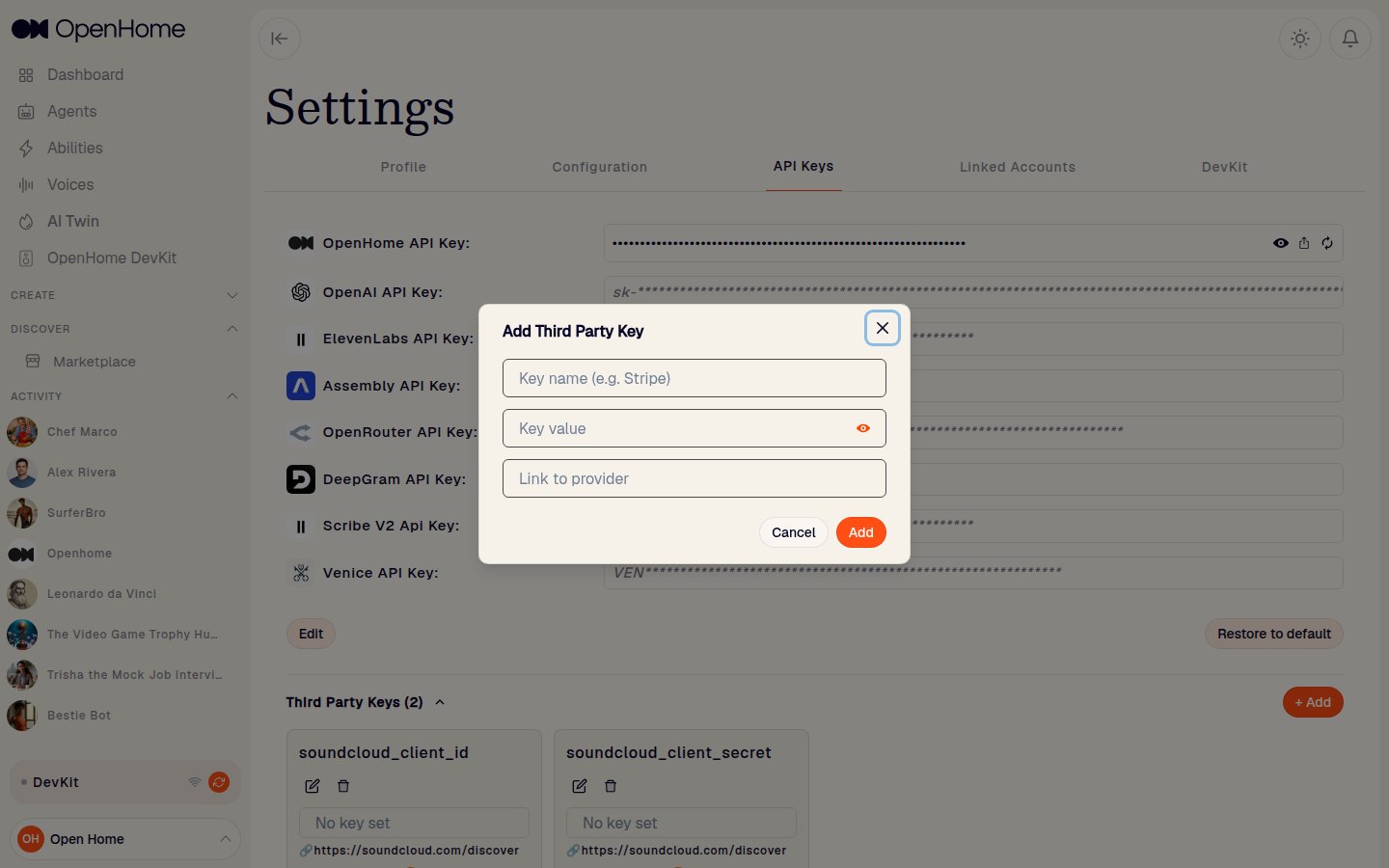
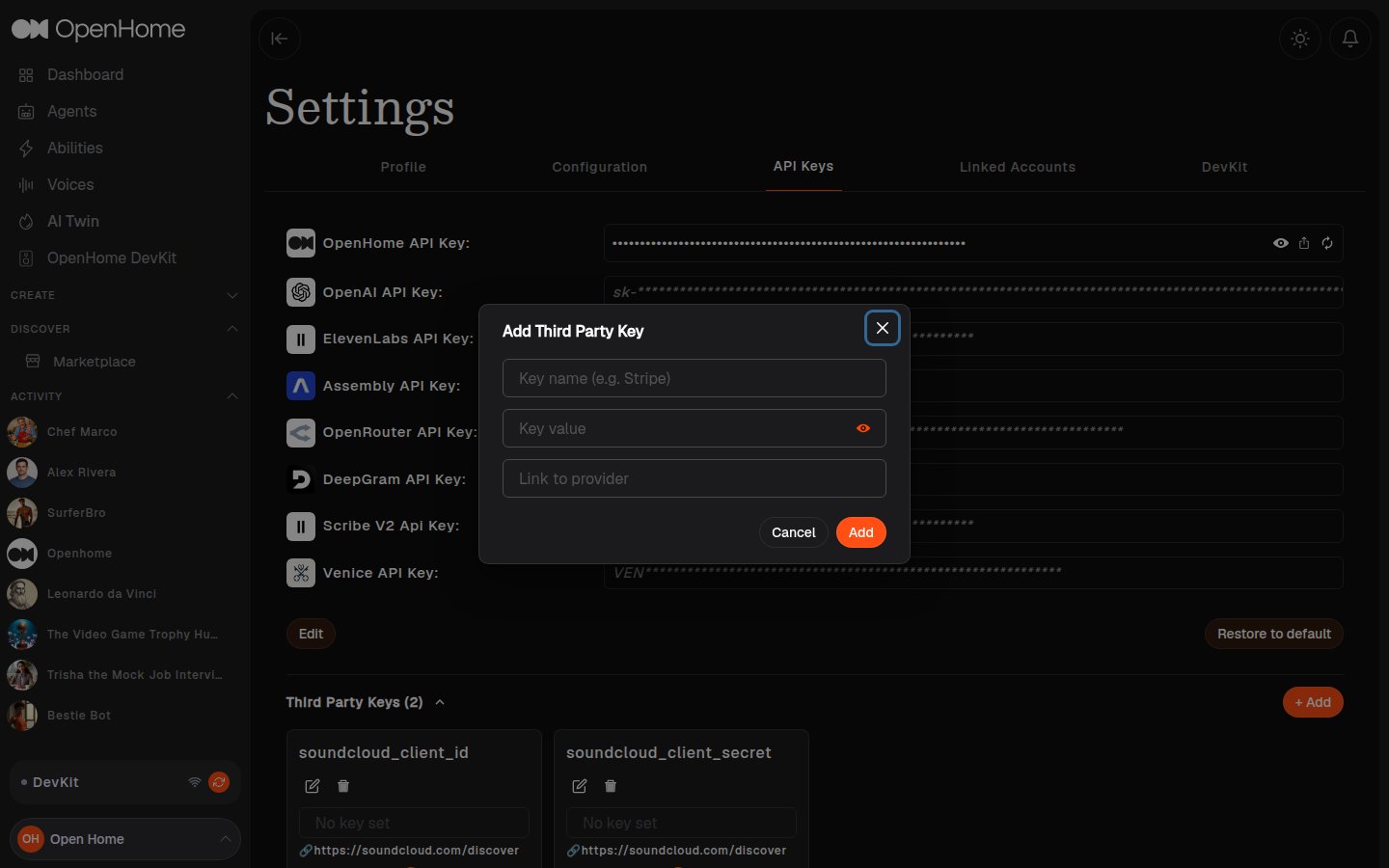
Go to Settings → API Keys, find Third Party Keys, and click + Add. The dialog takes three things:- Key name: the exact name your code will ask for, for example
n2yo_api_key. - Key value: the secret itself. It is stored masked and is never shown again in full.
- Link to provider: the URL where the key comes from, so anyone using the Ability knows where to get their own.
2. Read the value at runtime
main.py so it is easy to find and change, as the API template does:
3. Tell your users which keys to add
Nothing prompts a user for keys automatically, so an Ability that needs one has to say so. List each key in the Ability’sREADME.md, giving the exact name and where to get the value. The Orbit Ability does this well:
Go to n2yo.com/api, create a free account, copy your API Key, and add it in your OpenHome Settings → API Keys as n2yo_api_key (name must match exactly).
Then degrade gracefully. Treat a missing key as an expected state, not a crash: fall back to cached or demo data where you can, and otherwise say what is missing out loud.
Never hardcode secrets in Ability code. Always read them at runtime with
get_api_keys(). Community Abilities are published as source, so anything hardcoded is public.Reading Linked Account Tokens with get_token()
For providers that support OAuth-based account linking, OpenHome stores the user’s access token on the user’s behalf when they connect the account from Settings → Linked Accounts in the Dashboard. Inside an Ability, use get_token() to retrieve that token and call the provider’s API on behalf of the user without handling the OAuth flow yourself.
This is different from Custom API Keys above: API keys are values the user pastes in for arbitrary third-party services, while get_token() returns an OAuth access token managed by OpenHome for a supported provider.
Signature
get_token() is synchronous, do not await it.
get_token() parameters
Returns
- A non-empty
straccess token if the user has linked the requested provider. Noneor an empty value if the provider is not linked for the user. Always guard the return value before using it.
Example: token lookup with a connect-account fallback
The recommended pattern is to read the token at the start ofrun() and, if it is missing, speak a clear instruction telling the user where to connect the account, then exit cleanly.
"slack", "discord", "microsoft", "tesla") and the spoken instruction to match the account your Ability needs.
Reference Abilities Using get_token()
The following community Abilities use get_token("google") in production. Review them for end-to-end patterns covering token retrieval, API calls, and error handling:
- Morning Brief: reads Gmail and Google Calendar to generate a daily summary.
- Gmail Voice Assistant: voice-driven Gmail inbox management.
- Google Calendar: view, create, and update calendar events by voice.
- Google Tasks: manage Google Tasks lists by voice.
Making HTTP Requests
When your Ability calls an API, always route the request throughself.worker.session_tasks. This lets the SDK manage the request for you: it paces outbound calls and smooths out latency, so a slow or heavy API doesn’t block your Agent or affect other Abilities.
Do not call requests, httpx, or aiohttp directly, use the matching session_tasks helper instead. This applies to code you write by hand and to code generated by an AI assistant.
The simplest option is get(). It works just like the requests library: give it a URL and read the response with .json().
get() accepts the usual arguments (params, headers, timeout, auth) and returns a standard requests.Response.
Which helper should I use?
Most Abilities can just useget(). You only need the others if you want an async call or prefer a different library. When you do, the choice depends on how your method is written:
- Normal
defmethod → use a sync helper and call it directly, with noawait:get()orhttpx_get(). async defmethod (for example, a background-daemon loop) → use an async helper andawaitit:get_async(),httpx_get_async(), oraiohttp_get_async(). Async helpers don’t freeze the rest of your Ability while the request is running, so prefer them whenever your method is already async.
requests has no async version of its own, so get_async() is there to give you a requests-style request that you can await.
Every library has the same helpers, so pick the one you’re comfortable with:
Examples
With
requests and httpx, you read the response directly with .json(), .text, and .status_code. With aiohttp, reading the body is also asynchronous, so use await resp.json() and await resp.text().Understanding CapabilityWorker
The CapabilityWorker class simplifies I/O interactions, enabling:
- Speech synthesis: Using text-to-speech (TTS).
- Listening for user input: Capturing and processing responses.
- Running interaction loops: Supporting conversational flows.
CapabilityWorker Quick Reference
Use these functions directly onself.capability_worker.
Conversation
Speak text to the user using the configured TTS.True or False.
city, region, country, postal, timezone, ip, loc, and more.
Text Generation
Return plain text from the model (no speech).File Helpers
Read a file.Note: Storage Scope Usage
- Use
in_ability_directory=Falsefor persistent user-level storage shared across abilities.- Use
in_ability_directory=Truefor ability-scoped data that should remain isolated within the ability session.
Context Storage (Key-Value)
Audio and Streaming
Music Playback
For audio that runs for minutes and can be interrupted by voice, usestream_music_from_url. It plays a progressive mp3 link, blocks until playback genuinely ends, and reports why it ended. Your Ability owns only the branch on outcome. The audio pipeline, the device buffer, music mode, and the recovery afterwards are all inside the call.
Returns exactly
{"outcome", "position", "sent"}. position is measured at the halt instant rather than after cleanup, so it is an honest number for logs. Resuming needs nothing from it.
No duration is asked for, and no position is tracked. The engine reads the byte rate off the mp3’s own frame header, so a track with missing or wrong metadata still plays and resumes correctly.
Do not assume a stream url handed back by an authenticated API is self-signed. SoundCloud’s is not: without the header its CDN answers
401, and 429 once a few tracks have been tried in a row. If every track comes back unplayable, check auth first.url, which makes playback a loop. Four rules live in your code, not in the function:
- Resolve the
urlonce per track, not per pass. A fresh url reads as a new track and restarts it from the top. This is the one cost of the url being the resume signal: if a signed link expires while the user sits paused, re-resolving restarts the track. - Only
"paused"loops.finished,stopped,error, andunplayableall leave. - An unclear pause reply should stop, not resume. A user who asked for silence must not get the track back because a reply did not parse.
announceon the first pass only, or every resume re-announces the title.
music-template directly. Only two functions are yours to fill in:
outcome branch, the resume_normal_flow() on exit, can be left alone.
WebSocket / Device Actions
Using Specific Voice IDs for Text-to-Speech
The CapabilityWorker class supports the use of specific Voice IDs for text-to-speech (TTS) functionality. This allows you to customize the voice used for speech synthesis by specifying a Voice ID from the provided list.Available Voice IDs
You can use any of the following Voice IDs for TTS:text_to_speech Function
Thetext_to_speech function converts the provided text into speech using the specified Voice ID and streams it to the user via WebSocket.
text_to_speech parameters
text (str): The text to be converted into speech.voice_id (str): The Voice ID to be used for speech synthesis.
Exiting an Ability
An Ability returns control to the Agent when it finishes its work by callingresume_normal_flow(). Beyond that normal completion, there are two ways to leave a Skill Ability on demand: the built-in exit phrases the SDK recognizes, and exit handling you add in your own code.
Built-in exit phrases
While a Skill Ability is active, the SDK recognizes a fixed set of spoken exit phrases. Speaking any of them ends the current Ability and returns control to the Agent’s conversation flow. This is the same outcome as callingresume_normal_flow(), but initiated by the user rather than by the Ability. This is built in and requires no additional code, so a user always has a way out of an Ability, including one that is mid-conversation or waiting for input.
The recognized exit phrases are:
- “open home exit”
- “openhome exit”
- “open home quit”
- “openhome quit”
- “open home, quit”
- “open home, exit”
- “exit open home”
- “quit open home”
- “exit, open home”
- “quit, open home”
Note: Built-in exit phrases apply to Skill Abilities.
Handling exit in your own code
You can also end an Ability from your own code. Detect an exit condition in the user’s input, such as your own stop words, and callresume_normal_flow() to return control to the Agent.
Advanced CapabilityWorker Functions
Audio Processing Functions
TheCapabilityWorker provides comprehensive audio handling capabilities:
play_audio: Play audio content directly or file objectsplay_from_audio_file: Play audio files stored in the capability directorysend_audio_data_in_stream: Stream processed audio data over WebSocket
Text Generation Functions
Multiple options for text generation:text_to_text_response: Standard text generation with history and system promptsgenerate_ttt_using_openrouter: Alternate text generation using OpenRouterllm_search: Web-search-backed short answerllm_tools: Tool-calling with the model
Streaming and Communication
Advanced communication features:stream_initandstream_end: Manage audio streaming sessionsstream_music_from_url: Play a progressive mp3 link, blocking until playback genuinely ends, and report why it ended. See Music Playback for the full reference and Example 4 for a complete Ability.send_data_over_websocket: Send custom data over WebSocketsend_interrupt_signal: Interrupt ongoing output and hand control back to user inputsend_agent_message_without_audio: Send a text reply without TTSsend_devkit_action: Trigger a DevKit actionsend_devkit_mqtt_action: Trigger a DevKit MQTT action to control a smart device. See Controlling MQTT Devices for the full reference and an example Ability.
Context and Session Helpers
get_timezone: Read the current user’s timezone for local-time-aware behaviorget_token: Read the access token of a user-linked provider account ("google","slack","discord","microsoft","tesla"). See Reading Linked Account Tokens withget_token()for the full reference and arun()example with a fallback message when the account isn’t connected.get_api_keys: Read custom API key values from Settings → API Keys by key nameget_full_message_history: Read full session message history for context-aware responsesupdate_personality_agent_prompt: Append context/instructions to the Agent personality promptcreate_key/update_key/delete_key: Manage structured key-value context storageget_single_key/get_all_keys: Read one or all stored context entries
Recording and Local Audio
get_audio_recording: Load the latest user recording bytesget_audio_recording_length: Duration in seconds for the latest recordingflush_audio_recording: Clear the current recording before a new captureplay_from_audio_file: Play an audio file stored in the Ability directory
Session Task Utilities (replace raw asyncio usage)
To ensure Abilities run within the agent’s managed lifecycle, avoid using rawasyncio helpers directly.
- Use
self.worker.session_tasks.sleep(seconds: float)instead ofasyncio.sleep(...):
Background Daemon Entry Point (background.py)
Background daemons run automatically when a session starts. Use a separate background.py file with this entry signature:
- Keep daemon logic inside a continuous
while Trueloop. - Use
await self.worker.session_tasks.sleep(...)between cycles. - Do not call
resume_normal_flow()inside daemon loops. - Call
await self.capability_worker.send_interrupt_signal()before daemon speech/audio.
Example 1: Basic Capability
This Ability creates a daily life advisor that:- Asks the user for a problem: Initiates a conversation to gather user input.
- Provides advice: Offers a solution based on user input.
- Collects feedback: Captures user satisfaction with the advice.
Example 1 code
Key Functions
speak: Introduces the advisor and provides the solution.user_response: Captures user input (e.g., their problem).run_io_loop: Combines speaking the solution and listening for feedback.resume_normal_flow: Resumes the agent’s default workflow after interaction.
Example 2: Weather Capability
This Ability integrates a weather API to fetch and share weather updates based on user-provided locations.Example 2 code
Example 2 key features
- External API Call: Fetches real-time weather data.
- Geolocation: Validates and processes user-provided locations.
- Error Handling: Provides meaningful feedback for invalid inputs.
Allowed/Disallowed Libraries and Patterns
The following imports, keywords, and patterns are not allowed in Abilities. Use the safe alternatives.Blocked Imports and Keywords
Guidance:
- Avoid direct storage/infra access. Use platform-provided helpers within
CapabilityWorker/workeror request an API if needed. - Use the provided logging (
editor_logging_handler) instead of prints. - For files, prefer platform abstractions and per-user capability folders, and ask for an approved helper if you need persistent storage.
- For HTTP GET requests, always use the
self.worker.session_taskshelpers (get,get_async,httpx_get,httpx_get_async,aiohttp_get_async). Never callrequests,httpx, oraiohttpdirectly. See Making HTTP Requests.
Security Guidance
Avoid insecure or unsafe patterns such as runtimeassert checks, exec() of dynamic code, binding servers to all interfaces, hardcoded secrets, swallowing exceptions, insecure deserialization (pickle/dill/shelve/marshal), weak hashes like MD5, or weak cipher modes (e.g., ECB). If you have a special case, request approval and an approved wrapper/utility.
Conclusion
Building Abilities in OpenHome empowers developers to create custom functionalities for AI agents. With the examples like the Basic Advisor and Weather Capability, you can:- Core Communication: Use
speak,run_io_loop, anduser_responsefor basic interactions. - Advanced Audio: Play custom audio files, and stream audio data.
- Text Generation: Leverage multiple text-to-text options with history and system prompts.
- Voice Customization: Use specific voice IDs for varied and engaging responses.
- External APIs: Integrate third-party services for dynamic functionality.
CapabilityWorker provides all the tools needed to create sophisticated, interactive Abilities.
Start creating innovative Abilities and push the boundaries of voice AI with OpenHome! 🎉
Note: For GET requests to third-party APIs, useself.worker.session_tasks.get()(see Making HTTP Requests). It takes the same arguments as therequestsmodule’sget()and returns the same response. For other request types, use therequestsmodule and avoid other libraries. If you need a library that isn’t available, you can request that we add it.
Example 3: Read/Write File (from example_main.py)
This is the simplest pattern for per-user storage.
Example 4: Music Playback
stream_music_from_url() plays a track and blocks until playback genuinely ends, then reports why in result["outcome"]. Only "paused" continues the loop, and a resume is the same call again with the same url. See the Music Playback reference above for the full parameter and outcome tables.
Example 4 key features
- One
awaitcovers the whole track. The audio pipeline, the device buffer, music mode and the recovery afterwards are all inside the call, sospeak()works on the very next line no matter how playback ended. - No duration, no position, no byte offset. The engine reads the byte rate off the mp3’s own frame header, so a track with missing or wrong metadata still plays and resumes correctly.
- The URL is resolved once per track, outside the loop: handing the same url back is what resumes a pause, so a fresh url would restart the track instead.
authis positional, so it cannot be forgotten. Pass""for a host that wants noAuthorizationheader.- An unclear pause reply stops. A user who asked for silence must not get the track back because a reply didn’t parse.